In our previous article, we explored why monitoring is critical in CI/CD pipelines and outlined essential strategies for each deployment stage. Now, let's dig deeper into implementation
In our previous article Monitoring in CI/CD Pipelines: Essential Strategies for DevOps Teams, we explored why monitoring is critical in CI/CD pipelines and outlined essential strategies for each deployment stage. Now, let's dig deeper into implementation—how to create effective feedback loops, set up real-world monitoring with GitHub Actions, and prepare for emerging trends in CI/CD monitoring.
4. Creating Monitoring Feedback Loops
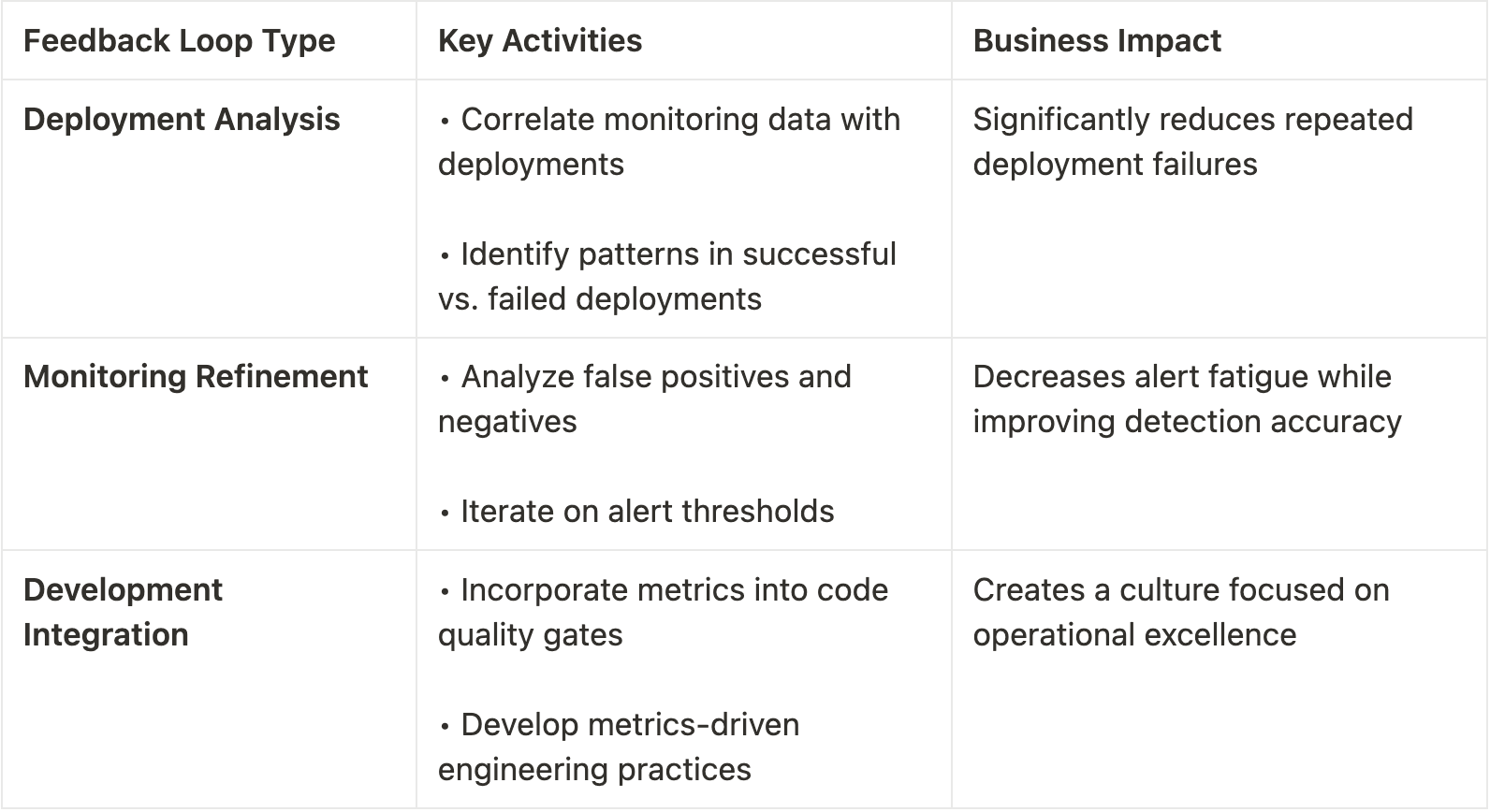
📌 Key Takeaway: Effective monitoring doesn't end with alerts—it creates continuous feedback loops that improve both your monitoring system and your development processes. These loops transform monitoring from a cost center into a valuable driver of operational excellence.
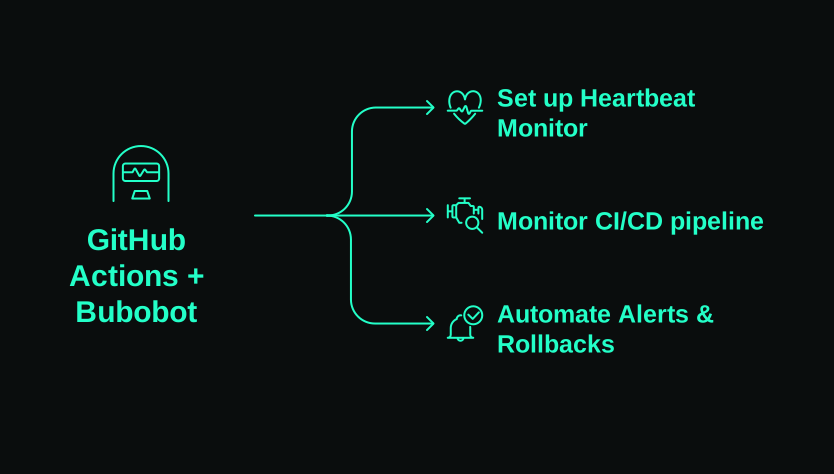
5. Real-World Implementation with GitHub Actions + Bubobot
Let's explore how to implement comprehensive CI/CD monitoring using GitHub Actions and Bubobot's monitoring capabilities. This practical example shows you exactly how to integrate monitoring into your deployment pipeline.
Example: Integrating Bubobot's Heartbeat Monitoring into GitHub Actions
Let's walk through implementing an automated system that verifies deployment health and triggers alerts/rollbacks for an e-commerce API service where uptime is critical to business operations.
1. Set up a Bubobot heartbeat monitor
First, you'll need to create a heartbeat monitor in Bubobot that will track your deployment health.
- Sign up or log in to your Bubobot account
- Create a new heartbeat monitor in your dashboard
- Note your unique heartbeat URL
For detailed setup instructions, refer to Bubobot's official documentation at https://docs.bubobot.com/monitor-types/heartbeat-missed
2. Monitor CI/CD pipeline status
Next, implement real-time monitoring during your deployment process using GitHub Actions:
# Add this to your .github/workflows/deploy.yml file deployment-monitoring: runs-on: ubuntu-latest steps: - name: Start deployment run: | # Signal deployment start to Bubobot curl -X POST "<https://heartbeat.bubobot.com/$>{{ secrets.BUBOBOT_HEARTBEAT_ID }}" \\ -d "message=Starting deployment of ${{ github.repository }} (commit: ${{ github.sha }})"- name: Deploy application id: deploy run: | # Your deployment commands here # ... - name: Monitor deployment health run: | # Check service health post-deployment for i in {1..5}; do echo "Performing health check $i/5..." if curl -s "<https://api.example.com/health>" | grep -q "\\"status\\":\\"healthy\\""; then # Signal successful health check to Bubobot curl -X POST "<https://heartbeat.bubobot.com/$>{{ secrets.BUBOBOT_HEARTBEAT_ID }}" \\ -d "message=Deployment healthy - API responding correctly" exit 0 fi sleep 10 done # If we get here, health checks failed curl -X POST "<https://heartbeat.bubobot.com/$>{{ secrets.BUBOBOT_HEARTBEAT_ID }}/fail" \\ -d "message=Deployment health checks failed after 5 attempts" exit 1
This workflow:
- Signals the start of a deployment to Bubobot
- Attempts to deploy your application
- Performs health checks to verify deployment success
- Sends success or failure notifications to your Bubobot heartbeat monitor
The detailed context messages in the heartbeat calls provide valuable diagnostic information if something goes wrong, helping your team quickly identify and fix issues.
3. Automate alerts & rollbacks based on failed deployments
Finally, set up automated rollbacks that trigger when monitoring detects deployment failures:
# Add this to .github/workflows/auto-rollback.yml name: Automatic Rollbackon: repository_dispatch: types: [heartbeat_failure]
jobs: rollback: runs-on: ubuntu-latest steps: - name: Checkout repository uses: actions/checkout@v3
- name: Get deployment info run: | echo "Heartbeat failure detected in deployment" echo "Failure details: ${{ github.event.client_payload.message }}" - name: Execute rollback run: | # Your rollback commands here (e.g., deploy previous known-good version) echo "Rolling back to previous stable version..." # kubectl rollout undo deployment/api-service - name: Notify rollback status run: | curl -X POST "<https://heartbeat.bubobot.com/$>{{ secrets.BUBOBOT_HEARTBEAT_ID }}" \\ -d "message=Automatic rollback executed for ${{ github.repository }}" # Notify team via Slack/Teams/etc curl -X POST "${{ secrets.SLACK_WEBHOOK_URL }}" \\ -H "Content-Type: application/json" \\ -d '{"text":"⚠️ Automatic rollback executed due to failed deployment health checks"}'
Configure Bubobot to trigger this workflow by setting up a web-hook in Bubobot that calls the GitHub repository_dispatch API when heartbeat failures occur.
📌 Key Takeaway: By integrating Bubobot's monitoring capabilities with GitHub Actions, you create a powerful system that automatically verifies deployments, alerts on failures, and executes rollbacks without human intervention—drastically reducing downtime and recovery time.
6. Conclusion & Future Trends in CI/CD Monitoring
As CI/CD practices continue to evolve, monitoring must evolve with them. Understanding where the industry is headed helps you prepare your monitoring strategy for the future.
Several companies are pushing the boundaries of what's possible in CI/CD monitoring:
- CircleCI with their Insights dashboard that provides deployment analytics
- LaunchDarkly with their feature flag integration for safer deployments
- Datadog with their extensive monitoring and observability platform
- Bubobot with their ultra-short interval monitoring and AI-powered alerting
Together, these innovations are creating a future where deployments are faster, safer, and more reliable than ever before.
Next Steps: Start Integrating Monitoring Into Your CI/CD Pipelines Today
You don't need to implement everything at once. Start by:
- Identifying the most critical points in your deployment pipeline
- Setting up basic monitoring uptime checks for those points
- Gradually adding more sophisticated monitoring as you go
Even small improvements to your monitoring can significantly reduce incidents and recovery time. The key is to start now, before the next production outage forces your hand.
Ready to secure your CI/CD pipelines with industry-leading uptime monitoring? Visit Bubobot.com for a free trial with access to all monitoring types including HTTP, server, and specialized service monitoring with the industry's shortest monitoring intervals.